SUNAPI
v2.6.8
2026-04-09

Copyright
Restriction
Disclaimer
Contact Information
Hanwha Vision Co., Ltd.
Hanwha Vision 6, Pangyo-ro 319beon-gil, Bundang-gu, Seongnam-si, Gyeonggi-do, 13488, KOREA
www.hanwhavision.com
Hanwha Vision America
500 Frank W. Burr Blvd. Suite 43 Teaneck, NJ 07666
hanwhavisionamerica.com
Hanwha Vision Europe
Heriot House, Heriot Road, Chertsey, Surrey, KT16 9DT, United Kingdom
hanwhavision.eu
Hanwha Vision Middle East FZE
Jafza View 18, Office 2001-2003, Po Box 263572, Jebel Ali Free Zone, Dubai, United Arab Emirates
www.hanwhavision.com/ar
1. Introduction
In SUNAPI, accesscontrol.cgi is newly added to manage access control systems. This guide provides an overview of SUNAPI and describes how to manage an access control system.
Basic Components and its relationship in an Access Control System
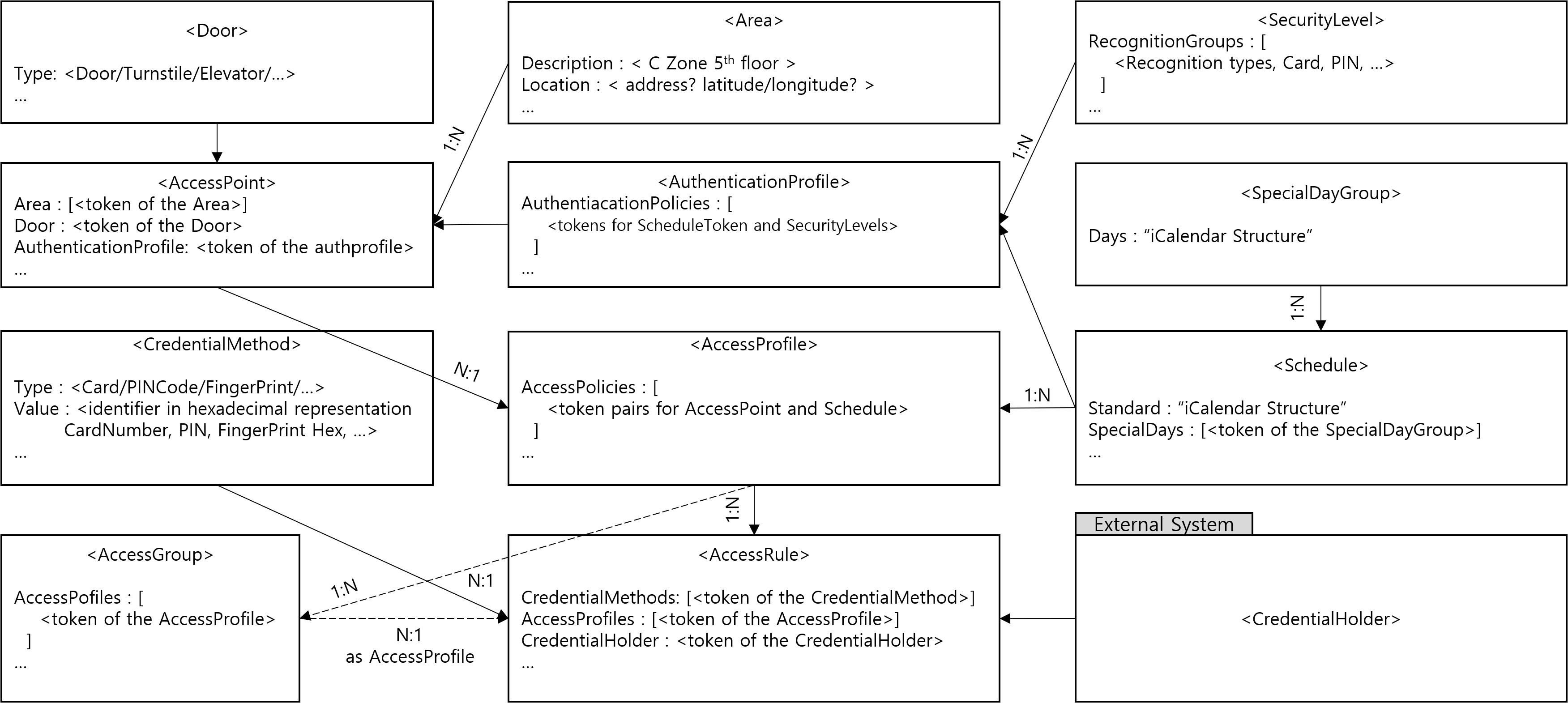
2. Overview
The following submenus are defined in accesscontrol.cgi.
-
capabilities: Checks the ACS capabilities provided by the device.
-
configuration: Supports ACS config backup, restore, and reset.
-
door: Manages actual physical doors such as door, turnstile, elevator, etc.
-
credentialreader: Manages reader information to read authentication information such as card, PIN, etc.
-
area: Manages user-created conceptual areas.
-
securitylevel: Defines security levels using individual or combined recognition methods (logical AND/OR), or no recognition method (open).
-
authenticationprofile: Specifies how credential holders are granted access by defining when different security levels are required.
-
accesspoint: Manages AccessPoint, which represents the relationship between N areas accessible through one door.
-
specialdaygroup: Manages exceptions to regular schedules, such as public holidays, election days, and foundation days.
-
accessschedule: Access schedule management (DateFrom-To, TimeFrom-To, SpecialDay, SpecialTime)
-
accessprofile: AccessProfile consisting of N Access Policies, Access Policy consists of N AccessSchedules for 1 AccessPoint
-
accessgroup: Group consisting of AccessProfiles
-
credentialholder: Manages users who can possess credentials.
-
credentialholderimage: Registers and manages credentialholder’s image.
-
credentialmethod: Registers and manages credential methods such as card, PINCode, and FingerPrint.
-
accessrule: Complete Credential consisting of CredentialMethod, CredentialHolder, and AccessProfile.
-
clientfilter: Restricts access to access control functions by filtering IP (Peer information used for filtering can be expanded).
3. Capability
3.1. Description
The capabilities submenu of accesscontrol.cgi is used to retrieve the capabilities of the accesscontrol system.
Access level
| Action | ACS |
|---|---|
view | Suser |
3.2. Syntax
http://\<Device IP\>/stw-cgi/accesscontrol.cgi?msubmenu=capabilities&action=view
3.3. Parameters
| Action | Parameters | Request/ Response | Type/ Value | Description |
|---|---|---|---|---|
|
view |
Door.MaxCount |
RES |
<int> |
Indicates the maximum number of doors supported by the device. |
|
CredentialReader.MaxCount |
RES |
<int> |
Indicates the maximum number of readers supported by the device. | |
|
AuthenticationProfile.MaxAuthenticationProfiles |
RES |
<int> |
Indicates the maximum number of authentication profiles. | |
|
AuthenticationProfile.MaxPoliciesPerAuthenticationProfile |
RES |
<int> |
Indicates the maximum number of authentication policies per authentication profile. | |
|
SecurityLevel.MaxSecurityLevels |
RES |
<int> |
Indicates the maximum number of security levels. | |
|
SecurityLevel.MaxRecognitionGroupsPerSecurityLevel |
RES |
<int> |
Indicates the maximum number of recognition groups per security level. | |
|
SecurityLevel.MaxRecognitionMethodsPerRecognitionGroup |
RES |
<int> |
Indicates the maximum number of recognition methods per recognition group. | |
|
SecurityLevel.SupportedAuthenticationModes |
RES |
<enum> |
A list of supported authentication modes | |
|
Schedule.MaxCount |
RES |
<int> |
Indicates the maximum number of schedules the device supports. | |
|
Schedule.MaxTimePeriodsPerDay |
RES |
<int> |
Indicates the maximum number of time periods per day the device supports in a schedule including special days schedule. | |
|
Schedule.MaxSpecialDayGroups |
RES |
<int> |
Indicates the maximum number of special day group entities the device supports. | |
|
Schedule.MaxDaysInSpecialDayGroup |
RES |
<int> |
Indicates the maximum number of days per SpecialDayGroup entity the device supports. | |
|
Schedule.MaxSpecialDaysPerSchedules |
RES |
<int> |
Indicates the maximum number of SpecialDaysSchedule entities referred by a schedule that the device supports. | |
|
Schedule.ExtendedRecurrenceSupported |
RES |
<bool> |
Indicates that the device supports extended iCalendar recurrence format | |
|
Schedule.SpecialDaysSupported |
RES |
<bool> |
Indicates that the device supports special days | |
|
Schedule.StateReportingSupported |
RES |
<bool> |
Indicates that the device supports state reporting | |
|
AccessPoint.MaxCount |
RES |
<int> |
Indicates the maximum number of access points supported by the device. | |
|
AccessPoint.MaxAreas |
RES |
<int> |
Indicates the maximum number of areas supported by the device. | |
|
AccessProfile.MaxCount |
RES |
<int> |
Indicates the maximum number of access profiles supported by the device. | |
|
AccessProfile.MaxAccessPoliciesPerAccessProfile |
RES |
<int> |
Indicates the maximum number of access policies per access profile supported by the device. | |
|
AccessProfile.MaxSchedulesPerAccessPolicy |
RES |
<int> |
Indicates the maximum number of schedules per access policy supported by the device. | |
|
AccessProfile.MultipleSchedulesPerAccessPointSupported |
RES |
<bool> |
Indicates whether or not several access policies can refer to the same access point in an access profile. | |
|
AccessGroup.MaxCount |
RES |
<int> |
The maximum number of access profiles per access group supported by the device. | |
|
CredentialMethod.MaxCount |
RES |
<int> |
The maximum number of credentialmethod supported by the device. | |
|
Credential.CredentialValiditySupported |
RES |
<bool> |
Indicates that the device supports credential validity. | |
|
Credential.CredentialAccessProfileValiditySupported |
RES |
<bool> |
Indicates that the device supports validity on the association between a credential and an access profile. | |
|
Credential.ValiditySupportsTimeValue |
RES |
<bool> |
Indicates that the device supports both date and time value for validity. If set to false, then the time value is ignored. | |
|
Credential.MaxCount |
RES |
<int> |
The maximum number of credential supported by the device. | |
|
Credential.MaxAccessProfilesPerCredential |
RES |
<int> |
The maximum number of access profiles for a credential. | |
|
Credential.MaxCredentialMethodsPerCredential |
RES |
<int> |
The maximum number of credential methods for a credential. | |
|
Credential.MaxGroupsPerCredential |
RES |
<int> |
The maximum number of groups for a credential. | |
|
Credential.ResetAntipassbackSupported |
RES |
<bool> |
Indicates the device supports resetting of anti-passback violations and notifying on anti-passback violations. | |
|
Credential.DefaultCredentialSuspensionDuration |
RES |
<string> |
The default time period that the credential will temporary be suspended (e.g. by using the wrong PIN a predetermined number of times). The time period is defined as an [ISO 8601] duration string (e.g. "PT5M") | |
|
Credential.SupportedIdentifierType |
RES |
<csv> |
Card, PIN, Fingerprint, Face, Iris, Vein, Palm, Retina, LicensePlate |
3.4. Examples
3.4.1. Get device capabilities
REQUEST
http://\<Device IP\>/stw-cgi/accesscontrol.cgi?msubmenu=capabilities&action=view
RESPONSE
{
    "Capabilities": {
        "Door": {
            "MaxCount": 15
        },
        "CredentialReader": {
            "MaxCount": 4
        },
        "AuthenticationProfile": {
            "MaxAuthenticationProfiles": 10,
            "MaxPoliciesPerAuthenticationProfile": 10
        },
        "SecurityLevel": {
            "MaxSecurityLevels": 10,
            "MaxRecognitionGroupsPerSecurityLevel": 10,
            "MaxRecognitionMethodsPerRecognitionGroup": 10,
            "SupportedAuthenticationModes": [
                "SingleCredential",
                "DualCredential"
            ]
        },
        "Schedule": {
            "MaxCount": 15,
            "MaxTimePeriodsPerDay": 10,
            "MaxSpecialDayGroups": 10,
            "MaxDaysInSpecialDayGroup": 10,
            "MaxSpecialDaysPerSchedules": 10,
            "ExtendedRecurrenceSupported": false,
            "SpecialDaysSupported": true,
            "StateReportingSupported": false
        },
        "AccessPoint": {
            "MaxCount": 15,
            "MaxAreas": 10
        },
        "AccessProfile": {
            "MaxCount": 15,
            "MaxAccessPoliciesPerAccessProfile": 15,
            "MultipleSchedulesPerAccessPointSupported": true
        },
        "CredentialMethod": {
            "MaxCount": 10
        },
        "Credential": {
            "CredentialValiditySupported": true,
            "CredentialAccessProfileValiditySupported": true,
            "ValiditySupportsTimeValue": true,
            "MaxCount": 10,
            "MaxAccessProfilesPerCredential": 10,
            "ResetAntipassbackSupported": true,
            "DefaultCredentialSuspensionDuration": "PT1M",
            "SupportedIdentifierType": [
                "Card",
                "PIN",
                "Fingerprint",
                "Face",
                "Iris",
                "Vein",
                "Palm",
                "Retina",
                "LicensePlate"
            ]
        }
    }
}
4. configuration
4.1. Description
The configuration submenu of accesscontrol.cgi is used to manage the configuration.
Access level
| Action | ACS |
|---|---|
backup | Suser |
restore | Suser |
reset | Suser |
add | Suser |
4.2. Syntax
http://\<Device IP\>/stw-cgi/accesscontrol.cgi?msubmenu=configuration&action=backup
4.3. Parameters
| Action | Parameters | Request/ Response | Type/ Value | Description |
|---|---|---|---|---|
|
backup | ||||
|
restore | ||||
|
reset | ||||
|
add |
Type |
REQ |
<enum> |
4.4. Examples
4.4.1. Config Backup
backup makes a copy of all accesscontrol settings for backup.
The format of the configuration is device-dependent.
The device can restart after making a copy of the accesscontrol settings for backup.
REQUEST
http://\<Device IP\>/stw-cgi/accesscontrol.cgi?msubmenu=configuration&action=backup
RESPONSE
Content-Type: application/octet-stream
Content-Disposition: attachment; filename=acsconfigbackup.bin

<config file content>
4.4.2. Config Restore
restore the accesscontrol configuration by using the backup.
The format of the configuration is device-dependent.
The device can restart after a configuration restore.
REQUEST
http://\<Device IP\>/stw-cgi/accesscontrol.cgi?msubmenu=configuration&action=restore

There are two types of Content-Type that can be used in the Request Header.
 - application/x-www-form-urlencoded
 - application/octet-stream

Content-Length must indicate the entire size of the file content.
When using urlencoded type, the size after being encoded in base64 format must be indicated.

POST /stw-cgi/accesscontrol.cgi?msubmenu=configuration&action=restore HTTP/1.1
Content-type: application/x-www-form-urlencoded; charset=utf-8
Content-Length: <content length>

<config file content>
RESPONSE
{
    "Response": "Success"
}
4.4.3. Reset Config
REQUEST
http://\<Device IP\>/stw-cgi/accesscontrol.cgi?msubmenu=configuration&action=reset
RESPONSE
{
    "Response": "Success"
}
5. door
5.1. Description
The door submenu of accesscontrol.cgi is used to manage doors.
Access level
| Action | ACS |
|---|---|
view | Suser |
add | Suser |
update | Suser |
remove | Suser |
control | Suser |
check | Suser |
5.2. Syntax
http://\<Device IP\>/stw-cgi/accesscontrol.cgi?msubmenu=door&action=view[&\<parameter\>=\<value\>]
5.3. Parameters
| Action | Parameters | Request/ Response | Type/ Value | Description |
|---|---|---|---|---|
|
view |
Token |
REQ, RES |
<string> | |
|
update |
Token |
REQ,RES |
<string> |
add: The token of the created door will be the response. |
|
Name |
REQ |
<string> | ||
|
Enable |
REQ |
<bool> | ||
|
Description |
REQ |
<string> | ||
|
Type |
REQ |
<enum> | ||
|
Mode |
REQ |
<enum> | ||
|
ExitSignalUnlock |
REQ |
<bool> |
Indicates whether unlocking the door on request-to-exit is supported. | |
|
ExitSignalGrantWithoutUnlock |
REQ |
<bool> |
When this value is set to true, the ExitSignalUnlock value is ignored, and when a REX signal occurs, unlock is not performed and only a Grant event is generated. | |
|
NotifyOnREXSignal |
REQ |
<bool> |
Configures whether a change in the state of the IOPort connected to the REX is notified as a REXActivated event. | |
|
DoorHeldMonitoring |
REQ |
<bool> |
Indicates whether monitoring for DoorOpenTooLong is supported. | |
|
DoorHeldMonitoringWhenUnlocked |
REQ |
<bool> |
Indicates whether monitoring DoorOpenTooLong event when unlocked schedule is supported. | |
|
DoorHeldAlertSignal |
REQ |
<bool> |
Indicates whether the buzzer is triggered when DoorOpenTooLong is detected. | |
|
DoorForcedEntryMonitoring |
REQ |
<bool> |
Indicates whether monitoring DoorForcedOpen is supported. | |
|
DoorForcedEntryAlertSignal |
REQ |
<bool> |
Indicates whether triggering buzzer when DoorForcedOpen is detected is supported. | |
|
RelockMode |
REQ |
<enum> |
Condition for relocking. | |
|
Capabilities.Access |
REQ |
<bool> |
Indicates whether performing momentary access is supported. | |
|
Capabilities.AccessTimingOverride |
REQ |
<bool> |
Indicates whether overriding configured timing is supported. | |
|
Capabilities.Lock |
REQ |
<bool> |
Supports LockDoor | |
|
Capabilities.Unlock |
REQ |
<bool> |
Supports UnlockDoor | |
|
Capabilities.Block |
REQ |
<bool> |
Supports BlockDoor | |
|
Capabilities.DoubleLock |
REQ |
<bool> |
Supports DoubleLockDoor | |
|
Capabilities.LockDown |
REQ |
<bool> |
Supports LockDown and put it in LockedDown mode | |
|
Capabilities.LockOpen |
REQ |
<bool> |
Supports LockOpen and put it in LockedOpen mode | |
|
Capabilities.DoorMonitor |
REQ |
<bool> |
Supports DoorPhysicalState event | |
|
Capabilities.LockMonitor |
REQ |
<bool> |
Supports LockPhysicalState event | |
|
Capabilities.DoubleLockMonitor |
REQ |
<bool> |
Supports DoubleLockPhysicalState event | |
|
Capabilities.Alarm |
REQ |
<bool> |
Supports door alarm and the DoorAlarm event | |
|
Capabilities.Tamper |
REQ |
<bool> |
This Door instance has a Tamper detector and supports the DoorTamper event | |
|
Capabilities.Fault |
REQ |
<bool> |
Supports door fault and the DoorFault event | |
|
IOPort.ReaderIn |
REQ |
<int> |
IO port number | |
|
IOPort.ReaderOut |
REQ |
<int> |
IO port number | |
|
IOPort.Lock |
REQ |
<int> |
IO port number | |
|
IOPort.DoorPositionSwitch |
REQ |
<int> |
IO port number | |
|
IOPort.RexIn |
REQ |
<int> |
IO port number | |
|
IOPort.RexOut |
REQ |
<int> |
IO port number | |
|
Timings.ReleaseTime |
REQ |
<int> |
The time from when the latch is unlocked until it is relocked again | |
|
Timings.MaxOpenTime |
REQ |
<int> |
The time from when the door is physically opened until the door is set in the DoorOpenTooLong alarm state | |
|
Timings.ExtendedReleaseTime |
REQ |
<int> |
Some individuals need extra time to open the door before the latch relocks. If supported, ExtendedReleaseTime shall be added to ReleaseTime | |
|
Timings.DelayTimeBeforeRelock |
REQ |
<int> |
If the door is physically opened after access is granted, then DelayTimeBeforeRelock is the time from when the door is physically opened until the latch goes back to locked state | |
|
Timings.ExtendedOpenTime |
REQ |
<int> |
Some individuals need extra time to pass through the door. If supported, ExtendedOpenTime shall be added to MaxOpenTime | |
|
control |
Command |
REQ |
<enum> |
Access: temporarily allow access |
|
check |
Token |
REQ, RES |
<string> | |
|
Name |
RES |
<string> | ||
|
Enable |
RES |
<bool> | ||
|
Description |
RES |
<string> | ||
|
Type |
RES |
<enum> | ||
|
State.DoorPhysicalState |
RES |
<enum> | ||
|
State.LockPhysicalState |
RES |
<enum> | ||
|
State.DoubleLockPhysicalState |
RES |
<enum> | ||
|
State.Alarm |
RES |
<enum> | ||
|
State.Tamper.Reason |
RES |
<string> | ||
|
State.Tamper.State |
RES |
<enum> | ||
|
State.Fault.Reason |
RES |
<string> | ||
|
State.Fault.State |
RES |
<enum> | ||
|
State.DoorMode |
RES |
<enum> |
5.4. Examples
5.4.1. Get doors
REQUEST
http://\<Device IP\>/stw-cgi/accesscontrol.cgi?msubmenu=door&action=view
RESPONSE
{
  "Doors": [
    {
      "Token": "doortoken1",
      "Name": "door1",
      "Enable": false,
      "Description": "Access Point 1",
      "Type" : "Door",
      "Mode" : "Lock",
      "OverrideSchedule": "",
      "ExitSignalUnlock": true,
      "DoorHeldMonitoring": true,
      "DoorHeldMonitoringWhenUnlocked": false,
      "DoorHeldAlertSignal": true,
      "DoorForcedEntryMonitor": true,
      "DoorForcedEntryAlertSignal": true,
      "Capabilities": {
        "Access": true,
        "AccessTimingOverride": true,
        "Lock": true,
        "Unlock": true,
        "Block": false,
        "DoubleLock": false,
        "LockDown": false,
        "LockOpen": false,
        "DoorMonitor": false,
        "LockMonitor": false,
        "DoubleLockMonitor": false,
        "Alarm": true,
        "Tamper": false,
        "Fault": true
      },
      "IOPort": {
        "ReaderIn": 1,
        "ReaderOut": 2,
        "Lock": 3,
        "DoorPositionSwitch": 4,
        "RexIn": 5,
        "RexOut": 6
      },
      "Timings": {
        "ReleaseTime": 1,
        "MaxOpenTime": 1,
        "ExtendedReleaseTime": 0,
        "DelayTimeBeforeRelock": 5,
        "ExtendedOpenTime ": 0
      }
    }
  ]
}
5.4.2. Update door
REQUEST
http://\<Device IP\>/stw-cgi/accesscontrol.cgi?msubmenu=door&action=update&Token=doortoken1&Type=Elevator
RESPONSE
{
    "Response": "Success"
}
5.4.3. Check door state
REQUEST
http://\<Device IP\>/stw-cgi/accesscontrol.cgi?msubmenu=door&action=check&Token=doortoken1
RESPONSE
{
  "Doors": [
    {
      "Token": "doortoken1",
      "Name": "door1",
      "Enable": true,
      "Description": "Access Point 1",
      "Type" : "Door",
      "State": {
        "DoorPhysicalState": "Closed",
        "LockPhysicalState": "Locked",
        "DoubleLockPhysicalState": "Unlocked",
        "Alarm": "Normal",
        "Tamper": {
          "Reason": "",
          "State": "NotInTamper"
        },
        "Fault": {
          "Reason": "",
          "State": "NotInFault"
        },
        "DoorMode": "Locked"
      }
    }
  ]
}
5.4.4. Remove door
REQUEST
http://\<Device IP\>/stw-cgi/accesscontrol.cgi?msubmenu=door&action=remove&Token=doortoken1,doortoken2
RESPONSE
{
    "Response": "Success"
}
6. credentialreader
6.1. Description
The credentialreader submenu of accesscontrol.cgi is for managing the readers.
Access level
| Action | ACS |
|---|---|
view | Suser |
set | Suser |
control | Suser |
6.2. Syntax
http://\<Device IP\>/stw-cgi/accesscontrol.cgi?msubmenu=credentialreader&action=view
6.3. Parameters
| Action | Parameters | Request/ Response | Type/ Value | Description |
|---|---|---|---|---|
|
view |
Index |
REQ,RES |
<int> | |
|
set |
Index |
REQ,RES |
<int> | |
|
Mode |
REQ,RES |
<enum> | ||
|
BaudRate |
REQ,RES |
<enum> |
Not fixed yet | |
|
EnableSecureCommunication |
REQ,RES |
<bool> |
Only for OSDP | |
|
Reader.#.Address |
REQ |
<int> | ||
|
Reader.#.Enable |
REQ |
<bool> | ||
|
Reader.#.Silence |
REQ |
<bool> | ||
|
check |
Index |
REQ,RES |
<int> | |
|
Reader.Index |
REQ,RES |
<int> | ||
|
Reader.#.Address |
RES |
<string> | ||
|
Reader.#.LastRead.Identifier |
RES |
<string> | ||
|
Reader.#.LastRead.Time |
RES |
<string> | ||
|
control |
Index |
REQ |
<int> | |
|
Reader.Index |
REQ |
<int> | ||
|
Mode |
REQ |
<enum> |
6.4. Examples
6.4.1. Get credentialreaders
REQUEST
http://\<Device IP\>/stw-cgi/accesscontrol.cgi?msubmenu=credentialreader&action=view
RESPONSE
{
  "CredentialReaders": [
    {
      "Index": 1,
      "Mode": "OSDP",
      "BaudRate": 9600,
      "EnableSecureCommunication": false,
      "Reader": [
        {
          "Index": 1,
          "Address": 0
        },
        {
          "Index": 2,
          "Address": 0
        }
      ]
    }
  ]
}
6.4.2. Set credentialreader
REQUEST
http://\<Device IP\>/stw-cgi/accesscontrol.cgi?msubmenu=credentialreader&action=set&Index=1&Mode=OSDP&BaudRate=9600&EnableSecureCommunication=True&Reader.1.Address=1&Reader.2.Address=10
RESPONSE
{
    "Response": "Success"
}
7. area
7.1. Description
The area submenu of accesscontrol.cgi is for managing the area.
Access level
| Action | ACS |
|---|---|
view | Suser |
add | Suser |
update | Suser |
remove | Suser |
7.2. Syntax
http://\<Device IP\>/stw-cgi/accesscontrol.cgi?msubmenu=area&action=view
7.3. Parameters
| Action | Parameters | Request/ Response | Type/ Value | Description |
|---|---|---|---|---|
|
view |
Token |
REQ, RES |
<string> | |
|
add/update |
Token |
REQ,RES |
<string> |
add: The token of the created area will be the response. |
|
Name |
REQ |
<string> | ||
|
Description |
REQ |
<string> | ||
|
remove |
Token |
REQ |
<string> |
7.4. Examples
7.4.1. Get areas
REQUEST
http://\<Device IP\>/stw-cgi/accesscontrol.cgi?msubmenu=area&action=view
RESPONSE
{
  "Areas": [
    {
      "Token": "areatoken1",
      "Name": "area1",
      "Description": "C Zone"
    }
  ]
}
7.4.2. Add area
REQUEST
http://\<Device IP\>/stw-cgi/accesscontrol.cgi?msubmenu=area&action=add&Name=test_area&Description=add_area_test
RESPONSE
{
    "Token": "areatoken1"
}
7.4.3. Update area
REQUEST
http://\<Device IP\>/stw-cgi/accesscontrol.cgi?msubmenu=area&action=update&Token=areatoken1&Description=DZone
RESPONSE
{
    "Response": "Success"
}
7.4.4. Remove areas
REQUEST
http://\<Device IP\>/stw-cgi/accesscontrol.cgi?msubmenu=area&action=remove&Token=areatoken1,areatoken2
RESPONSE
{
    "Response": "Success"
}
8. securitylevel
8.1. Description
The securitylevel submenu of accesscontrol.cgi is for managing the securitylevel.
Access level
| Action | ACS |
|---|---|
view | Suser |
8.2. Syntax
http://\<Device IP\>/stw-cgi/accesscontrol.cgi?msubmenu=securitylevel&action=view
8.3. Parameters
| Action | Parameters | Request/ Response | Type/ Value | Description |
|---|---|---|---|---|
|
view |
Token |
REQ, RES |
<string> | |
|
Name |
REQ |
<string> | ||
|
Priority |
REQ |
<int> |
A higher number indicates that the security level is considered more secure than security levels with lower priorities. The priority is used when an authentication profile have overlapping schedules with different security levels. When an access point is accessed, the authentication policies are walked through in priority order (highest priority first). When a schedule is found covering the time of access, the associated security level is used and processing stops. Two security levels cannot have the same priority | |
|
Description |
REQ |
<string> | ||
|
RecognitionGroups.Index |
REQ |
<int> | ||
|
RecognitionGroups.#.Methods.Index |
REQ |
<int> | ||
|
RecognitionGroups.#.Methods.#.Type |
REQ |
<enum> |
The recognition groups are used to define a logical OR between the groups. | |
|
RecognitionGroups.#.Methods.#.Order |
REQ |
<int> |
8.4. Examples
8.4.1. Get securitylevels
REQUEST
http://\<Device IP\>/stw-cgi/accesscontrol.cgi?msubmenu=securitylevel&action=view
RESPONSE
{
  "SecurityLevels": [
    {
      "Token": "securityleveltoken1",
      "Name": "securitylevel1",
      "Priority": 1,
      "Description": "card first and pin",
      "RecognitionGroups" : [
        {
          "Index": 1,
          "Methods": [
            {
              "Index": 1,
              "Type": "Card",
              "Order": 1
            },
            {
              "Index": 2,
              "Type": "PIN",
              "Order": 2
            }
          ]
        }
      ]
    }
  ]
}
9. authenticationprofile
9.1. Description
The authenticationprofile submenu of accesscontrol.cgi is for managing the authenticationprofile.
Access level
| Action | ACS |
|---|---|
view | Suser |
add | Suser |
update | Suser |
remove | Suser |
9.2. Syntax
http://\<Device IP\>/stw-cgi/accesscontrol.cgi?msubmenu=authenticationprofile&action=view
9.3. Parameters
| Action | Parameters | Request/ Response | Type/ Value | Description |
|---|---|---|---|---|
|
view |
Token |
REQ, RES |
<string> | |
|
add/update |
Token |
REQ,RES |
<string> |
add: The token of the created authenticationprofile will be the response. |
|
Name |
REQ |
<string> | ||
|
DefaultSecurityLevelToken |
REQ |
<string> |
The default security level is used if none of the authentication policies has a schedule covering the time of access (or if no authentication policies are defined). | |
|
Description |
REQ |
<string> | ||
|
AuthenticationPolicies.#.Direction |
REQ |
<enum> |
default is InOut | |
|
AuthenticationPolicies.#.ScheduleToken |
REQ |
<string> |
Each authentication policy associates a security level with a schedule (during which the
specified security level will be required at the access point) | |
|
AuthenticationPolicies.#.SecurityLevels.#.ActiveRegularSchedule |
REQ |
<bool> | ||
|
AuthenticationPolicies.#.SecurityLevels.#.ActiveSpecialDaySchedule |
REQ |
<bool> | ||
|
AuthenticationPolicies.#.SecurityLevels.#.SecurityLevelToken |
REQ |
<string> | ||
|
AuthenticationPolicies.#.SecurityLevels.#.AuthenticationMode |
REQ |
<enum> |
Single: Normal mode where only one credential holder is required to be granted access | |
|
remove |
Token |
REQ |
<string> |
9.4. Examples
9.4.1. Get authenticationprofiles
REQUEST
http://\<Device IP\>/stw-cgi/accesscontrol.cgi?msubmenu=authenticationprofile&action=view
RESPONSE
{
  "AuthenticationProfiles": [
    {
      "Token": "authenticationprofiletoken1",
      "Name": "authenticationprofile1",
      "DefaultSecurityLevelToken": "securityleveltoken1",
      "Description": "test",
      "AuthenticationPolicies" : [
        {
          "Index": 1,
          "ScheduleToken": "scheduletoken1",
          "SecurityLevels": [
            {
              "Index": 1,
              "ActiveRegularSchedule": false,
              "ActiveSpecialDaySchedule": false,
              "AuthenticationMode": "Single",
              "SecurityLevelToken": "securityleveltoken2"
            }
          ]
        }
      ]
    }
  ]
}
9.4.2. Add authenticationprofile
REQUEST
http://\<Device IP\>/stw-cgi/accesscontrol.cgi?msubmenu=authenticationprofile&action=add&Name=authenticationprofile1&Description=test&DefaultSecurityLevelToken=securityleveltoken1&AuthenticationPolicies.1.ScheduleToken=scheduletoken1&AuthenticationPolicies.1.SecurityLevels.1.ActiveRegularSchedule=False&AuthenticationPolicies.1.SecurityLevels.1.ActiveSpecialDaySchedule=False&AuthenticationPolicies.1.SecurityLevels.1.AuthenticationMode=Single&AuthenticationPolicies.1.SecurityLevels.1.SecurityLevelToken=securityleveltoken1
RESPONSE
{
    "Token": "authenticationprofiletoken1"
}
9.4.3. Update authenticationprofile
Note that when an authentication profile is updated, then any previous authentication policies are replaced with the new list.
REQUEST
http://\<Device IP\>/stw-cgi/accesscontrol.cgi?msubmenu=authenticationprofile&action=update&Token=authenticationprofiletoken1&AuthenticationPolicies.1.ScheduleToken=scheduletoken1&AuthenticationPolicies.1.SecurityLevels.1.ActiveRegularSchedule=True&AuthenticationPolicies.1.SecurityLevels.1.ActiveSpecialDaySchedule=True&AuthenticationPolicies.1.SecurityLevels.1.AuthenticationMode=Dual&AuthenticationPolicies.1.SecurityLevels.1.SecurityLevelToken=securityleveltoken1
RESPONSE
{
    "Response": "Success"
}
9.4.4. Remove authenticationprofiles
REQUEST
http://\<Device IP\>/stw-cgi/accesscontrol.cgi?msubmenu=authenticationprofile&action=remove&Token=authenticationprofiletoken1,authenticationprofiletoken2
RESPONSE
{
    "Response": "Success"
}
10. accesspoint
10.1. Description
The accesspoint submenu of accesscontrol.cgi is for managing the accesspoint.
Access level
| Action | ACS |
|---|---|
view | Suser |
add | Suser |
update | Suser |
remove | Suser |
10.2. Syntax
http://\<Device IP\>/stw-cgi/accesscontrol.cgi?msubmenu=accesspoint&action=view
10.3. Parameters
| Action | Parameters | Request/ Response | Type/ Value | Description |
|---|---|---|---|---|
|
view |
Token |
REQ, RES |
<string> | |
|
add/update |
Token |
REQ,RES |
<string> |
add: The token of the created accesspoint will be the response. |
|
Name |
REQ |
<string> | ||
|
Enable |
REQ |
<bool> | ||
|
Description |
REQ |
<string> | ||
|
Areas |
REQ |
<csv> |
token list of areas | |
|
DoorType |
REQ |
<enum> | ||
|
DoorToken |
REQ |
<string> | ||
|
Capabilities.DisableAccessPoint |
REQ |
<bool> |
whether or not supports Enable/Disable | |
|
Capabilities.Duress |
REQ |
<bool> |
whether or not supports duress events | |
|
Capabilities.AnonymousAccess |
REQ |
<bool> |
whether or not support REX(RequestToExit) switch or other input that allows anonymous access | |
|
Capabilities.SupportedRecognitionTypes |
REQ |
<csv> | ||
|
AuthenticationProfileToken |
REQ |
<string> | ||
|
remove |
Token |
REQ |
<string> |
10.4. Examples
10.4.1. Get accesspoints
REQUEST
http://\<Device IP\>/stw-cgi/accesscontrol.cgi?msubmenu=accesspoint&action=view
RESPONSE
{
  "AccessPoints": [
    {
      "Token": "accesspointtoken1",
      "Name": "accesspoint1",
      "Enable": true,
      "Description": "",
      "Areas": [
        "areatoken1"
      ],
      "DoorType" : "Door",
      "DoorToken": "doortoken1",
      "Capabilities": {
        "DisableAccessPoint": true,
        "Duress": false,
        "AnonymousAccess": false,anonymous access
        "SupportedRecognitionTypes": ["Card", "PIN"]
      },
      "AuthenticationProfileToken": "authenticationprofiletoken1"
    }
  ]
}
10.4.2. Add accesspoint
REQUEST
http://\<Device IP\>/stw-cgi/accesscontrol.cgi?msubmenu=accesspoint&action=add&Name=accesspointname1&DoorToken=doortoken1&DisableAccessPoint=True&Duress=False&AnonymousAccess=False&SupportedRecognitionTypes=Card&AuthenticationProfileToken=authenticationprofiletoken1
RESPONSE
{
    "Token": "accesspointtoken1"
}
10.4.3. Update accesspoint
REQUEST
http://\<Device IP\>/stw-cgi/accesscontrol.cgi?msubmenu=accesspoint&action=update&Token=accesspointtoken1&SupportedRecognitionTypes=Card,PIN&Areas=areatoken1,areatoken2
RESPONSE
{
    "Response": "Success"
}
10.4.4. Remove accesspoints
REQUEST
http://\<Device IP\>/stw-cgi/accesscontrol.cgi?msubmenu=accesspoint&action=remove&Token=accesspointtoken1,accesspointtoken2
RESPONSE
{
    "Response": "Success"
}
11. accessschedule
11.1. Description
The accessschedule submenu of accesscontrol.cgi is for managing the accessschedule.
Access level
| Action | ACS |
|---|---|
view | Suser |
add | Suser |
update | Suser |
remove | Suser |
11.2. Syntax
http://\<Device IP\>/stw-cgi/accesscontrol.cgi?msubmenu=accessschedule&action=view
11.3. Parameters
| Action | Parameters | Request/ Response | Type/ Value | Description |
|---|---|---|---|---|
|
view |
Token |
REQ, RES |
<string> | |
|
add/update |
Token |
REQ,RES |
<string> |
add: The token of the created accessschedule will be the response. |
|
Name |
REQ |
<string> | ||
|
Enable |
REQ |
<bool> | ||
|
Description |
REQ |
<string> | ||
|
Standard |
REQ |
<string> |
iCalendar format | |
|
remove |
Token |
REQ |
<string> |
11.4. Examples
11.4.1. Get accessschedules
REQUEST
http://\<Device IP\>/stw-cgi/accesscontrol.cgi?msubmenu=accessschedule&action=view
RESPONSE
{
  "Schedules": [
    {
      "Token": "scheduletoken1",
      "Name": "weekdayschedule",
      "Enable": true,
      "Description": "Access on Weekdays from 09:00:00 to 18:00:00",
      "Standard": "BEGIN:VCALENDAR\r\nBEGIN:VEVENT\r\nSUMMARY:Access on weekdays from 9 AM to 6 PM for employees\r\nDTSTART:19700101T090000\r\nDTEND: 19700101T180000\r\nRRULE:FREQ=WEEKLY;BYDAY=MO,TU,WE,TH,FR\r\nEND:VEVENT\r\nEND:VCALENDAR"
    }
  ]
}
11.4.2. Add accessschedule
REQUEST
http://\<Device IP\>/stw-cgi/accesscontrol.cgi?msubmenu=accessschedule&action=add&Name=accessschedulename2&Standard=BEGIN%3AVCALENDAR%5Cr%5CnBEGIN%3AVEVENT%5Cr%5CnSUMMARY%3AAccess%20on%20weekdays%20from%208%20AM%20to%205%20PM%20for%20employees%5Cr%5CnDTSTART%3A19700101T080000%5Cr%5CnDTEND%3A%2019700101T170000%5Cr%5CnRRULE%3AFREQ%3DWEEKLY%3BBYDAY%3DMO%2CTU%2CWE%2CTH%2CFR%5Cr%5CnEND%3AVEVENT%5Cr%5CnEND%3AVCALENDAR
RESPONSE
{
    "Token": "accessscheduletoken2"
}
11.4.3. Update accessschedule(remove specialdays group)
REQUEST
http://\<Device IP\>/stw-cgi/accesscontrol.cgi?msubmenu=accessschedule&action=update&Token=accessscheduletoken1&\<parameter\>=\<value\>
RESPONSE
{
    "Response": "Success"
}
11.4.4. Remove accessschedules
REQUEST
http://\<Device IP\>/stw-cgi/accesscontrol.cgi?msubmenu=accessschedule&action=remove&Token=accessscheduletoken1,accessscheduletoken2
RESPONSE
{
    "Response": "Success"
}
12. accessprofile
12.1. Description
The accessprofile submenu of accesscontrol.cgi is for managing the accessprofile.
Access level
| Action | ACS |
|---|---|
view | Suser |
add | Suser |
update | Suser |
remove | Suser |
12.2. Syntax
http://\<Device IP\>/stw-cgi/accesscontrol.cgi?msubmenu=accessprofile&action=view
12.3. Parameters
| Action | Parameters | Request/ Response | Type/ Value | Description |
|---|---|---|---|---|
|
view |
Token |
REQ, RES |
<string> | |
|
add/update |
Token |
REQ, RES |
<string> |
add: The token of the created accessprofile will be the response. |
|
Name |
REQ |
<string> | ||
|
Enable |
REQ |
<bool> | ||
|
Type |
REQ |
<enum> | ||
|
Description |
REQ |
<string> | ||
|
AccessPolicies.Index |
REQ |
<int> | ||
|
AccessPolicies.#.ScheduleToken |
REQ |
<string> | ||
|
AccessPolicies.#.EntityToken |
REQ |
<string> | ||
|
AccessPolicies.#.EntityType |
REQ |
<enum> |
enum of the EntityTypes | |
|
remove |
Token |
REQ |
<string> |
12.4. Examples
12.4.1. Get accessprofiles
REQUEST
http://\<Device IP\>/stw-cgi/accesscontrol.cgi?msubmenu=accessprofile&action=view
RESPONSE
{
  "AccessProfiles": [
    {
      "Token": "accessprofiletoken1",
      "Name": "accessprofile1",
      "Enable": false,
      "Type": "Grant",
      "Description": "",
      "AccessPolicies": [
        {
          "Index": 1,
          "ScheduleToken": "scheduletoken1",
          "EntityToken": "accesspointtoken1",
          "EntityType": "AccessPoint"
        }
      ]
    }
  ]
}
12.4.2. Add accessprofile
REQUEST
http://\<Device IP\>/stw-cgi/accesscontrol.cgi?msubmenu=accessprofile&action=add&Name=weekdayprofile&AccessPolicies.1.ScheduleToken=weekdayschedule&AccessPolicies.1.EntityToken=accesspointtoken1
RESPONSE
{
    "Token": "accessprofiletoken2"
}
12.4.3. Update accessprofile
REQUEST
http://\<Device IP\>/stw-cgi/accesscontrol.cgi?msubmenu=accessprofile&action=update&Token=weekdayprofile&Description=for%20employees
RESPONSE
{
    "Response": "Success"
}
12.4.4. Remove accessprofiles
REQUEST
http://\<Device IP\>/stw-cgi/accesscontrol.cgi?msubmenu=accessprofile&action=remove&Token=weekdayprofile
RESPONSE
{
    "Response": "Success"
}
13. accessgroup
13.1. Description
The accessgroup submenu of accesscontrol.cgi is for managing the accessgroup.
Access level
| Action | ACS |
|---|---|
view | Suser |
add | Suser |
update | Suser |
remove | Suser |
13.2. Syntax
http://\<Device IP\>/stw-cgi/accesscontrol.cgi?msubmenu=accessgroup&action=view
13.3. Parameters
| Action | Parameters | Request/ Response | Type/ Value | Description |
|---|---|---|---|---|
|
view |
Token |
REQ, RES |
<string> | |
|
AccessRules.Token |
RES |
<string> | ||
|
AccessRules.Name |
RES |
<string> | ||
|
AccessRules.ImagePath |
RES |
<string> | ||
|
AccessRules.AccessLevel |
RES |
<string> | ||
|
AccessRules.Enable |
RES |
<bool> | ||
|
add/update |
Token |
REQ,RES |
<string> |
add: The token of the created accessgroup will be the response. |
|
Name |
REQ |
<string> | ||
|
Enable |
REQ |
<bool> | ||
|
Description |
REQ |
<string> | ||
|
AccessProfiles |
REQ |
<csv> |
csv list of the AccessProfiles | |
|
remove |
Token |
REQ |
<string> |
13.4. Examples
13.4.1. Get accessgroups
REQUEST
http://\<Device IP\>/stw-cgi/accesscontrol.cgi?msubmenu=accessgroup&action=view
RESPONSE
{
  "AccessGroups": [
    {
      "Token": "accessgrouptoken1",
      "Name": "accessgroup1",
      "Enable": false,
      "Description": "",
      "AccessProfiles": [
          "profiletoken1",
          "profiletoken2"
      ]
    }
  ]
}
13.4.2. Add accessgroup
REQUEST
http://\<Device IP\>/stw-cgi/accesscontrol.cgi?msubmenu=accessgroup&action=add&Name=accessgroup2&AccessProfiles=profiletoken1,profiletoken2
RESPONSE
{
    "Token": "accessgrouptoken2"
}
13.4.3. Update accessgroup
REQUEST
http://\<Device IP\>/stw-cgi/accesscontrol.cgi?msubmenu=accessgroup&action=update&Token=accessgrouptoken2&AccessProfiles=profiletoken1,profiletoken2,profiletoken3,profiletoken4,profiletoken5
RESPONSE
{
    "Response": "Success"
}
13.4.4. Remove accessgroups
REQUEST
http://\<Device IP\>/stw-cgi/accesscontrol.cgi?msubmenu=accessgroup&action=remove&Token=accessgrouptoken2
RESPONSE
{
    "Response": "Success"
}
14. credentialholder
14.1. Description
The credentialholder submenu of accesscontrol.cgi is for managing the credentialholder.
Access level
| Action | ACS |
|---|---|
view | Suser |
add | Suser |
update | Suser |
remove | Suser |
14.2. Syntax
http://\<Device IP\>/stw-cgi/accesscontrol.cgi?msubmenu=credentialholder&action=view
14.3. Parameters
| Action | Parameters | Request/ Response | Type/ Value | Description |
|---|---|---|---|---|
|
view |
Token |
REQ, RES |
<string> | |
|
add/update |
Token |
REQ,RES |
<string> |
add: The token of the created credentialholder will be the response. |
|
FirstName |
REQ |
<string> | ||
|
MiddleName |
REQ |
<string> | ||
|
LastName |
REQ |
<string> | ||
|
Description |
REQ |
<string> | ||
|
EmployeeID |
REQ |
<string> | ||
|
ImagePath |
RES |
<string> |
Readonly, Path to access registered images via credentialholderimage, blank if no image is registered | |
|
remove |
Token |
REQ |
<string> |
14.4. Examples
14.4.1. Get credentialholders
REQUEST
http://\<Device IP\>/stw-cgi/accesscontrol.cgi?msubmenu=credentialholder&action=view
RESPONSE
{
  "CredentialHolders": [
    {
      "Token": "credentialholdertoken1",
      "FirstName": "FirstName",
      "MiddleName": "MiddleName",
      "LastName": "LastName",
      "Description": "",
      "ImagePath": "/files/acs_image/credentialholdertoken1.png"
    }
  ]
}
14.4.2. Add credentialholder
REQUEST
http://\<Device IP\>/stw-cgi/accesscontrol.cgi?msubmenu=credentialholder&action=add&FirstName=Name1&MiddleName=Name2&LastName=Name3&Description=addcredentialholdertest
RESPONSE
{
    "Token": "credentialholdertoken2"
}
14.4.3. Update credentialholder
REQUEST
http://\<Device IP\>/stw-cgi/accesscontrol.cgi?msubmenu=credentialholder&action=update&Token=credentialholdertoken2&Description=updatecredentialholdertest
RESPONSE
{
    "Response": "Success"
}
14.4.4. Remove credentialholders
REQUEST
http://\<Device IP\>/stw-cgi/accesscontrol.cgi?msubmenu=credentialholder&action=remove&Token=credentialholdertoken2
RESPONSE
{
    "Response": "Success"
}
15. credentialholderimage
15.1. Description
The credentialholderimage submenu of accesscontrol.cgi is for managing the credentialholderimage.
Access level
| Action | ACS |
|---|---|
view | Suser |
add | Suser |
remove | Suser |
15.2. Syntax
http://\<Device IP\>/stw-cgi/accesscontrol.cgi?msubmenu=credentialholderimage&action=view
15.3. Parameters
| Action | Parameters | Request/ Response | Type/ Value | Description |
|---|---|---|---|---|
|
view |
CredentialHolderToken |
REQ, RES |
<string> |
<CredentialHolderToken>: <CredentialHolderImagePath> |
|
add |
CredentialHolderToken |
REQ,RES |
<string> |
Upload the credentialholder’s image |
|
remove |
CredentialHolderToken |
REQ |
<string> |
15.4. Examples
15.4.1. Get credentialholderimages
You can check the image by accessing the path confirmed by Response.
Example. 192.168.0.10/files/acs_image/testholder1.png
REQUEST
http://\<Device IP\>/stw-cgi/accesscontrol.cgi?msubmenu=credentialholderimage&action=view
RESPONSE
{
  "CredentialHolderImages": {
    "credentialholderimagetoken1": "/files/acs_image/credentialholderimagetoken1.png",
    "credentialholderimagetoken2": "/files/acs_image/credentialholderimagetoken2.png",
    "credentialholderimagetoken3": "/files/acs_image/credentialholderimagetoken3.png"
  }
}
15.4.2. Add credentialholderimage
REQUEST
http://\<Device IP\>/stw-cgi/accesscontrol.cgi?msubmenu=credentialholderimage&action=add&CredentialHolderToken=credentialholdertoken1

POST /stw-cgi/accesscontrol.cgi?msubmenu=credentialholderimage&action=add&CredentialHolderToken=credentialholdertoken1 HTTP/1.1
Content-Length: <content length>

<image file content>
RESPONSE
{
    "Response": "Success"
}
15.4.3. Remove credentialholderimages
REQUEST
http://\<Device IP\>/stw-cgi/accesscontrol.cgi?msubmenu=credentialholderimage&action=remove&CredentialHolderToken=credentialholdertoken1
RESPONSE
{
    "Response": "Success"
}
16. credentialmethod
16.1. Description
The credentialmethod submenu of accesscontrol.cgi is for managing the credentialmethod.
Access level
| Action | ACS |
|---|---|
view | Suser |
add | Suser |
update | Suser |
remove | Suser |
16.2. Syntax
http://\<Device IP\>/stw-cgi/accesscontrol.cgi?msubmenu=credentialmethod&action=view
16.3. Parameters
| Action | Parameters | Request/ Response | Type/ Value | Description |
|---|---|---|---|---|
|
view |
Token |
REQ, RES |
<string> | |
|
Limit |
REQ |
<string> |
Maximum number of entries to return. If not specified, less than one or higher than what the ACS Panel supports, the number of items is determined by the ACS Panel(Capability.CredentialMethod.MaxCount). | |
|
StartToken |
REQ |
<string> |
Start returning entries from this start token. If not specified, entries shall start from the beginning of the dataset. | |
|
NextStartToken |
RES |
<string> |
StartToken to use in next call to get the following items. If absent, no more items to get. | |
|
add/update |
Token |
REQ,RES |
<string> |
add: The token of the created credentialmethod will be the response. |
|
Name |
REQ |
<string> | ||
|
Enable |
REQ |
<bool> | ||
|
NeverExpire |
REQ |
<bool> | ||
|
ValidFrom |
REQ |
<string> |
The start dateTime validity of the credentialmethod. | |
|
ValidTo |
REQ |
<string> |
The expiration date/time validity of the credentialmethod. | |
|
FacilityCode |
REQ |
<string> | ||
|
CredentialHolderToken |
REQ |
<string> | ||
|
Format |
REQ |
<enum> | ||
|
Type |
REQ |
<enum> | ||
|
IsValueEncrypted |
REQ |
<bool> | ||
|
Value |
REQ |
<string> |
The value of the identifier in hexadecimal representation | |
|
ExemptedFromAuthentication |
REQ |
<bool> |
If set to true, this credential identifier is not considered for authentication. For example if the access point requests Card plus PIN, and the credential identifier of type PIN is exempted from authentication, then the access point will not prompt for the PIN | |
|
remove |
Token |
REQ |
<string> |
16.4. Examples
16.4.1. Get credentialmethods
REQUEST
http://\<Device IP\>/stw-cgi/accesscontrol.cgi?msubmenu=credentialmethod&action=view
RESPONSE
{
  "CredentialMethods": [
    {
      "Token": "credentialmethodtoken1",
      "Name": "PIN1",
      "Enable": true,
      "NeverExpire": true,
      "ValidFrom": "2024-06-18T00:00:00",
      "ValidTo": "9999-12-31T23:59:59",
      "FacilityCode": "facility_code_1",
      "CredentialHolderToken": "",
      "Type": "PIN",
      "Format": "26BIT",
      "ExemptedFromAuthentication": false,
      "Value": "ecb489bec489bec48948a"
    }
  ]
}
16.4.2. Add credentialmethod
REQUEST
http://\<Device IP\>/stw-cgi/accesscontrol.cgi?msubmenu=credentialmethod&action=add&Name=credential_card&Enable=True&Type=Card&Value=baef48eabf48aebf4
RESPONSE
{
    "Token": "credentialmethodtoken2"
}
16.4.3. Update credentialmethod
REQUEST
http://\<Device IP\>/stw-cgi/accesscontrol.cgi?msubmenu=credentialmethod&action=update&Token=credentialmethodtoken2&Enable=False
RESPONSE
{
    "Response": "Success"
}
16.4.4. Remove credentialmethods
REQUEST
http://\<Device IP\>/stw-cgi/accesscontrol.cgi?msubmenu=credentialmethod&action=remove&Token=credentialmethodtoken2
RESPONSE
{
    "Response": "Success"
}
17. accessrule
17.1. Description
The accessrule submenu of accesscontrol.cgi is for managing the accessrule.
Access level
| Action | ACS |
|---|---|
view | Suser |
add | Suser |
update | Suser |
remove | Suser |
17.2. Syntax
http://\<Device IP\>/stw-cgi/accesscontrol.cgi?msubmenu=accessrule&action=view
17.3. Parameters
| Action | Parameters | Request/ Response | Type/ Value | Description |
|---|---|---|---|---|
|
view |
Token |
REQ, RES |
<string> | |
|
Limit |
REQ |
<string> |
Maximum number of entries to return. If not specified, less than one or higher than what the ACS Panel supports, the number of items is determined by the ACS Panel(Capability.Credential.MaxCount). | |
|
StartToken |
REQ |
<string> |
Start returning entries from this start token. If not specified, entries shall start from the beginning of the dataset. | |
|
NextStartToken |
RES |
<string> |
StartToken to use in next call to get the following items. If absent, no more items to get. | |
|
add/update |
Token |
REQ,RES |
<string> |
add: The token of the created accessrule will be the response. |
|
Name |
REQ |
<string> | ||
|
Description |
REQ |
<string> | ||
|
CredentialHolderToken |
REQ |
<string> |
CredentialHolder token from external system | |
|
ValidFrom |
REQ |
<string> |
The start dateTime validity of the accessrule | |
|
ValidTo |
REQ |
<string> |
The expiration date/time validity of the accessrule | |
|
CredentialMethods |
REQ |
<csv> |
csv list of the CredentialMethods | |
|
NeverExpire |
REQ |
<bool> | ||
|
Pin |
REQ |
<string> |
token of the PIN type CredentialMethod | |
|
AccessProfileTokens |
REQ |
<csv> |
csv list of the AccessProfiles | |
|
AccessGroupTokens |
REQ |
<csv> |
csv list of the AccessGroups, can be empty | |
|
ExtendedGrantTime |
REQ |
<bool> |
indicating that the credential holder needs extra time to get through the door. ExtendedReleaseTime will be added to ReleaseTime, and ExtendedOpenTime will be added to OpenTime | |
|
State.Enabled |
REQ |
<bool> | ||
|
State.Reason |
REQ |
<string> | ||
|
State.AntipassbackViolated |
REQ |
<bool> |
Indicates if anti-passback is violated for the accessrule | |
|
remove |
Token |
REQ |
<string> |
17.4. Examples
17.4.1. Get accessrules
REQUEST
http://\<Device IP\>/stw-cgi/accesscontrol.cgi?msubmenu=accessrule&action=view
RESPONSE
{
  "AccessRules": [
    {
      "Token": "accressruletoken1",
      "Name": "AccessRule_1",
      "Description": "",
      "ValidFrom": "2009-10-10T12:00:00",
      "ValidTo": "2009-10-10T12:00:00",
      "CredentialHolderToken": "\<token_from_external\>",
      "CredentialMethods": [
        "Card1"
      ],
      "AccessProfileTokens": [
        "accessprofiletoken1"
      ],
      "AccessGroupTokens": [
        "accessgrouptoken1"
      ],
      "ExtendedGrantTime": false,
      "State": {
        "Enabled": true,
        "Reason": "",
        "AntipassbackViolated": false
      }
    }
  ]
}
17.4.2. Add accessrule
REQUEST
http://\<Device IP\>/stw-cgi/accesscontrol.cgi?msubmenu=accessrule&action=add&Name=AccessRule_2&CredentialHolderToken=holderfromexternalsystem&CredentialMethods=credentialmethodtoken1,credentialmethodtoken2&AccessProfileTokens=accessprofiletoken1,accessprofiletoken2,accessprofiletoken3,accessprofiletoken4
RESPONSE
{
    "Token": "accessruletoken2"
}
17.4.3. Update accessrule
REQUEST
http://\<Device IP\>/stw-cgi/accesscontrol.cgi?msubmenu=accessrule&action=update&Token=accessruletoken2&ValidFrom=2024-01-01T00%3A00%3A00&ValidTo=2024-12-31T23%3A59%3A59
RESPONSE
{
    "Response": "Success"
}
17.4.4. Remove accessrules
REQUEST
http://\<Device IP\>/stw-cgi/accesscontrol.cgi?msubmenu=accessrule&action=remove&Token=accessruletoken2
RESPONSE
{
    "Response": "Success"
}
18. clientfilter
18.1. Description
The clientfilter submenu of accesscontrol.cgi is for managing the clientfilter.
Access level
| Action | ACS |
|---|---|
view | Suser |
set | Suser |
add | Suser |
update | Suser |
remove | Suser |
18.2. Syntax
http://\<Device IP\>/stw-cgi/accesscontrol.cgi?msubmenu=clientfilter&action=view
18.3. Parameters
| Action | Parameters | Request/ Response | Type/ Value | Description |
|---|---|---|---|---|
|
view | ||||
|
set |
AccessType |
REQ,RES |
<enum> | |
|
PartnerType |
REQ,RES |
<enum> | ||
|
Enable |
REQ,RES |
<bool> | ||
|
add/update |
Index |
REQ,RES |
<int> | |
|
IPType |
REQ,RES |
<enum> | ||
|
FilterEnable |
REQ,RES |
<bool> | ||
|
Address |
REQ,RES |
<string> |
IPv4Address or IPv6Address | |
|
remove |
Index |
REQ,RES |
<int> |
18.4. Examples
18.4.1. Get accessrules
REQUEST
http://\<Device IP\>/stw-cgi/accesscontrol.cgi?msubmenu=clientfilter&action=view
RESPONSE
{
  "AccessType": "Allow",
  "PartnerType": "WACS",
  "Enable": true,
  "IPFilters": [
    {
      "Index": 1,
      "IPType": "IPv4",
      "FilterEnable": true,
      "Address": "123.123.123.123"
    }
  ]
}
18.4.2. Set clientfilter
REQUEST
http://\<Device IP\>/stw-cgi/accesscontrol.cgi?msubmenu=clientfilter&action=set&AccessType=Allow&PartnerType=WACS&Enable=True
RESPONSE
{
    "Response": "Success"
}
18.4.3. Add clientfilter
REQUEST
http://\<Device IP\>/stw-cgi/accesscontrol.cgi?msubmenu=clientfilter&action=add&IPType=IPv4&Address=1.1.1.1&FilterEnable=True
RESPONSE
{
    "Index": 1
}
18.4.4. Update clientfilter
REQUEST
http://\<Device IP\>/stw-cgi/accesscontrol.cgi?msubmenu=clientfilter&action=update&Index=1&FilterEnable=False
RESPONSE
{
    "Response": "Success"
}
18.4.5. Remove accessrules
REQUEST
http://\<Device IP\>/stw-cgi/accesscontrol.cgi?msubmenu=clientfilter&action=remove&Index=1
RESPONSE
{
    "Response": "Success"
}
19. Annex A: Schedule Standard example
19.1. Access 24*7 for admin staff
{
  "Schedules": [
    {
      "Token": "scheduletoken1",
      "Name": "accessforadmin",
      "Enable": true,
      "Description": "Access 24*7 for admin staff",
      "Standard": "BEGIN:VCALENDAR
                    BEGIN:VEVENT
                    SUMMARY:Access 24*7
                    DTSTART:19700101T000000
                    DTEND:19700102T000000
                    RRULE:FREQ=WEEKLY;BYDAY=MO,TU,WE,TH,FR,SA,SU
                    END:VEVENT
                    END:VCALENDAR",
      "SpecialDays": []
    }
  ]
}
19.2. Access on Monday and Wednesday from 6 AM to 8 PM for cleaning staff
{
  "Schedules": [
    {
      "Token": "scheduletoken2",
      "Name": "accessforcleaningstaff",
      "Enable": true,
      "Description": "Access on Monday and Wednesday from 6 AM to 8 PM for cleaning staff",
      "Standard": "BEGIN:VCALENDAR
                    BEGIN:VEVENT
                    SUMMARY:Access on Monday and Wednesday from 6 AM to 8 PM
                    DTSTART:19700105T060000
                    DTEND:19700105T200000
                    RRULE:FREQ=WEEKLY;BYDAY=MO,WE
                    END:VEVENT
                    END:VCALENDAR",
      "SpecialDays": []
    }
  ]
}
19.3. Access from Friday 6 PM to Monday 7 AM for maintenance staff
{
  "Schedules": [
    {
      "Token": "scheduletoken3",
      "Name": "accessformaintenancestaff",
      "Enable": true,
      "Description": "Access from Friday 6 PM to Monday 7 AM for maintenance staff",
      "Standard": "BEGIN:VCALENDAR
                    BEGIN:VEVENT
                    SUMMARY:Access from Friday 6 PM to Monday 7 AM for maintenance staff
                    DTSTART:20140523T180000
                    DTEND:20140526T070000
                    RRULE:FREQ=WEEKLY;BYDAY=FR
                    END:VEVENT
                    END:VCALENDAR",
      "SpecialDays": []
    }
  ]
}
19.4. Access on Weekdays from 8 AM to 5 PM for employees
{
  "Schedules": [
    {
      "Token": "scheduletoken4",
      "Name": "accessforemployees",
      "Enable": true,
      "Description": "Access on Weekdays from 8 AM to 5 PM for employees",
      "Standard": "BEGIN:VCALENDAR
                    BEGIN:VEVENT
                    SUMMARY:Access on weekdays from 8 AM to 5 PM for employees
                    DTSTART:19700101T080000
                    DTEND: 19700101T170000
                    RRULE:FREQ=WEEKLY;BYDAY=MO,TU,WE,TH,FR
                    END:VEVENT
                    END:VCALENDAR",
      "SpecialDays": []
    }
  ]
}
19.5. Access from January 15, 2014, to January 14, 2015, from 9 AM to 6 PM
{
  "Schedules": [
    {
      "Token": "scheduletoken5",
      "Name": "accessforoneyear",
      "Enable": true,
      "Description": "Access from January 15, 2014, to January 14, 2015, from 9 AM to 6 PM",
      "Standard": "BEGIN:VCALENDAR
                    BEGIN:VEVENT
                    SUMMARY:Access from Jan 15, 2014, to Jan 14, 2015, from 9 AM to 6 PM
                    DTSTART:20140115T090000
                    DTEND:20150114T180000
                    RRULE:FREQ=DAILY
                    END:VEVENT
                    END:VCALENDAR",
      "SpecialDays": []
    }
  ]
}
20. Annex B: Extended iCalendar recurrence format
recur-rule-part =
        ( ( "YEARLY" )
        / ( "YEARLY" ";" "BYMONTH" "=" bymolist )
        / ( "MONTHLY" )
        / ( "MONTHLY" ";" "BYDAY" "=" bywdaylist )
        / ( "MONTHLY" ";" "BYMONTHDAY" "=" bymodaylist )
        / ( "WEEKLY" )
        / ( "WEEKLY" ";" "BYDAY" "=" (weekday *("," weekday)) )
        / ( "DAILY" )
        / ( "HOURLY" )
        / ( "MINUTELY" )
        / ( "SECONDLY" ) )
        [ ";" "INTERVAL" "=" 1*DIGIT ]
        [ ";" "COUNT" "=" 1*DIGIT / ";" "UNTIL" "=" enddate ]
21. Annex C: Event Status
Supported Type
| Type | Support |
|---|---|
Text | false |
Text Schema | true |
Json | false |
Json Schema | true |
21.1. AccessGranted
Notification that Access has been approved with a valid credential or anonymous user.
This is not property event, will only be sent when state change occurs.
21.1.1. Source & Data
| Item | Type | M/O | Description | |
|---|---|---|---|---|
Source | AccessPointToken | string | M | - |
IOPort | int | O | - | |
ReaderIndex | int | O | Only for credential | |
Data | Type | <enum> | M | - |
External | bool | O | - | |
AccessRuleToken | string | M | Only for credential | |
CredentialHolderName | string | M | ||
CredentialMethods | string | O | ||
SecurityLevelToken | string | O | ||
ExemptedAccess | bool | O |
21.1.2. Eventstatus sample
21.1.2.1. Json Schema
Credential
{
  "EventName": "AccessGranted",
  "Time": "2024-03-27T08:39:13.298+09:00",
  "Source": {
    "AccessPointToken": "aptoken1",
    "IOPort": 1,
    "ReaderIndex": 1
  },
  "Data": {
    "Type": "Credential",
    "External": false,
    "AccessRuleToken": "accessruletoken1",
    "CredentialHolderName": "abcd",
    "CredentialMethods": "credentialmethod1 credentialmethod2",
    "SecurityLevelToken": "securityleveltoken1",
    "ExemptedAccess": false
  }
}
Anonymous
{
  "EventName": "AccessGranted",
  "Time": "2024-03-27T08:39:13.298+09:00",
  "Source": {
    "AccessPointToken": "aptoken1",
    "IOPort": 1
  },
  "Data": {
    "Type": "Anonymous",
    "External": false
  }
}
21.1.2.2. Text Schema
Credential
AccessControl.AccessGranted.AccessPointToken.aptoken1.IOPort.1.ReaderIndex.1.Type=Credential
AccessControl.AccessGranted.AccessPointToken.aptoken1.IOPort.1.ReaderIndex.1.External=False
AccessControl.AccessGranted.AccessPointToken.aptoken1.IOPort.1.ReaderIndex.1.AccessRuleToken=accessruletoken1
AccessControl.AccessGranted.AccessPointToken.aptoken1.IOPort.1.ReaderIndex.1.CredentialHolderName=abcd
AccessControl.AccessGranted.AccessPointToken.aptoken1.IOPort.1.ReaderIndex.1.CredentialMethods=credentialmethod1 credentialmethod2
AccessControl.AccessGranted.AccessPointToken.aptoken1.IOPort.1.ReaderIndex.1.SecurityLevelToken=securityleveltoken1
AccessControl.AccessGranted.AccessPointToken.aptoken1.IOPort.1.ReaderIndex.1.ExemptedAccess=False
Anonymous
AccessControl.AccessGranted.AccessPointToken.aptoken1.IOPort.1.Type=Anonymous
AccessControl.AccessGranted.AccessPointToken.aptoken1.IOPort.1.External=False
21.2. AccessDenied
Notification that Access has been denied with a invalid credential or anonymous user.
This is not property event, will only be sent when state change occurs.
21.2.1. Source & Data
| Item | Type | M/O | Description | |
|---|---|---|---|---|
Source | AccessPointToken | string | M | - |
IOPort | int | O | - | |
ReaderIndex | int | O | Only for credential and CredentialNotFound | |
Data | Type | <enum> | M | - |
External | bool | O | Only for Credential and Anonymous | |
AccessRuleToken | string | O | Only for Credential | |
CredentialHolderName | string | O | ||
SecurityLevelToken | string | O | ||
Reason | <enum> | M | - | |
IdentifierType | <enum> | M | Only for Identifier | |
FormatType | <enum> | M | ||
IdentifierValue | string | M |
21.2.2. Eventstatus sample
21.2.2.1. Json Schema
Credential
{
  "EventName": "AccessDenied",
  "Time": "2024-03-27T08:39:13.298+09:00",
  "Source": {
    "AccessPointToken": "aptoken1",
    "IOPort": 1,
    "ReaderIndex": 1
  },
  "Data": {
    "Type": "Credential",
    "Reason": "CredentialExpired",
    "External": false,
    "AccessRuleToken": "accessruletoken1",
    "CredentialHolderName": "abcdewf",
    "SecurityLevelToken": "securityleveltoken1"
  }
}
Anonymous
{
  "EventName": "AccessDenied",
  "Time": "2024-03-27T08:39:13.298+09:00",
  "Source": {
    "AccessPointToken": "aptoken1",
    "IOPort": 1
  },
  "Data": {
    "Type": "Anonymous",
    "Reason": "Other",
    "External": false,
  }
}
CredentialNotFound
{
  "EventName": "AccessDenied",
  "Time": "2024-03-27T08:39:13.298+09:00",
  "Source": {
    "AccessPointToken": "aptoken1",
    "IOPort": 1,
    "ReaderIndex": 1
  },
  "Data": {
    "Type": "CredentialNotFound",
    "IdentifierType": "Card",
    "FormatType": "WIEGAND26",
    "IdentifierValue": "cab489acb48bc48"
  }
}
21.2.2.2. Text Schema
Credential
AccessControl.AccessDenied.AccessPointToken.aptoken1.IOPort.1.ReaderIndex.1.Type=Credential
AccessControl.AccessDenied.AccessPointToken.aptoken1.IOPort.1.ReaderIndex.1.Reason=CredentialExpired
AccessControl.AccessDenied.AccessPointToken.aptoken1.IOPort.1.ReaderIndex.1.External=False
AccessControl.AccessDenied.AccessPointToken.aptoken1.IOPort.1.ReaderIndex.1.AccessRuleToken=accessruletoken1
AccessControl.AccessDenied.AccessPointToken.aptoken1.IOPort.1.ReaderIndex.1.CredentialHolderName=abcdewf
AccessControl.AccessDenied.AccessPointToken.aptoken1.IOPort.1.ReaderIndex.1.SecurityLevelToken=securityleveltoken1
Anonymous
AccessControl.AccessDenied.AccessPointToken.aptoken1.IOPort.1.Type=Anonymous
AccessControl.AccessDenied.AccessPointToken.aptoken1.IOPort.1.Reason=Other
AccessControl.AccessDenied.AccessPointToken.aptoken1.IOPort.1.External=False
CredentialNotFound
AccessControl.AccessDenied.AccessPointToken.aptoken1.IOPort.1.ReaderIndex.1.Type=CredentialNotFound
AccessControl.AccessDenied.AccessPointToken.aptoken1.IOPort.1.ReaderIndex.1.IdentifierType=Card
AccessControl.AccessDenied.AccessPointToken.aptoken1.IOPort.1.ReaderIndex.1.IdentifierValue=cab489acb48bc48
21.3. AccessTaken
Notification that Access is taken.
This is not property event, will only be sent when state change occurs.
21.3.1. Source & Data
| Item | Type | M/O | Description | |
|---|---|---|---|---|
Source | AccessPointToken | string | M | - |
Data | Type | <enum> | M | - |
AccessRuleToken | string | M | Only for Credential | |
CredentialHolderName | string | O | Only for Credential | |
IdentifierType | <enum> | M | Only for Identifier | |
FormatType | <enum> | M | ||
IdentifierValue | string | M |
21.3.2. Eventstatus sample
21.3.2.1. Json Schema
Credential
{
  "EventName": "AccessTaken",
  "Time": "2024-03-27T08:39:13.298+09:00",
  "Source": {
    "AccessPointToken": "aptoken1"
  },
  "Data": {
    "Type": "Credential",
    "AccessRuleToken": "accessruletoken1",
    "CredentialHolderName": "credentialholdername1"
  }
}
Anonymous
{
  "EventName": "AccessTaken",
  "Time": "2024-03-27T08:39:13.298+09:00",
  "Source": {
    "AccessPointToken": "aptoken1"
  },
  "Data": {
    "Type": "Anonymous"
  }
}
Identifier
{
  "EventName": "AccessTaken",
  "Time": "2024-03-27T08:39:13.298+09:00",
  "Source": {
    "AccessPointToken": "aptoken1"
  },
  "Data": {
    "Type": "Identifier",
    "IdentifierType": "Card",
    "FormatType": "WIEGAND26",
    "IdentifierValue": "cab489acb48bc48"
  }
}
21.3.2.2. Text Schema
Credential
AccessControl.AccessTaken.AccessPointToken.aptoken1.Type=Credential
AccessControl.AccessTaken.AccessPointToken.aptoken1.AccessRuleToken=accessruletoken1
AccessControl.AccessTaken.AccessPointToken.aptoken1.CredentialHolderName=credentialholdername1
Anonymous
AccessControl.AccessTaken.AccessPointToken.aptoken1.Type=Anonymous
Identifier
AccessControl.AccessTaken.AccessPointToken.aptoken1.Type=Identifier
AccessControl.AccessTaken.AccessPointToken.aptoken1.IdentifierType=Card
AccessControl.AccessTaken.AccessPointToken.aptoken1.FormatType=WIEGAND26
AccessControl.AccessTaken.AccessPointToken.aptoken1.IdentifierValue=cab489acb48bc48
21.4. AccessNotTaken
Notification that Access is not taken in time.
This is not property event, will only be sent when state change occurs.
21.4.1. Source & Data
| Item | Type | M/O | Description | |
|---|---|---|---|---|
Source | AccessPointToken | string | M | - |
Data | Type | <enum> | M | - |
AccessRuleToken | string | M | Only for Credential | |
CredentialHolderName | string | O | Only for Credential | |
IdentifierType | <enum> | M | Only for Identifier | |
FormatType | <enum> | M | ||
IdentifierValue | string | M |
21.4.2. Eventstatus sample
21.4.2.1. Json Schema
Credential
{
  "EventName": "AccessNotTaken",
  "Time": "2024-03-27T08:39:13.298+09:00",
  "Source": {
    "AccessPointToken": "aptoken1"
  },
  "Data": {
    "Type": "Credential",
    "AccessRuleToken": "accessruletoken1",
    "CredentialHolderName": "credentialholdername1"
  }
}
Anonymous
{
  "EventName": "AccessNotTaken",
  "Time": "2024-03-27T08:39:13.298+09:00",
  "Source": {
    "AccessPointToken": "aptoken1"
  },
  "Data": {
    "Type": "Anonymous"
  }
}
Identifier
{
  "EventName": "AccessNotTaken",
  "Time": "2024-03-27T08:39:13.298+09:00",
  "Source": {
    "AccessPointToken": "aptoken1"
  },
  "Data": {
    "Type": "Identifier",
    "IdentifierType": "Card",
    "FormatType": "WIEGAND26",
    "IdentifierValue": "cab489acb48bc48"
  }
}
21.4.2.2. Text Schema
Credential
AccessControl.AccessNotTaken.AccessPointToken.aptoken1.Type=Credential
AccessControl.AccessNotTaken.AccessPointToken.aptoken1.AccessRuleToken=accessruletoken1
AccessControl.AccessNotTaken.AccessPointToken.aptoken1.CredentialHolderName=credentialholdername1
Anonymous
AccessControl.AccessNotTaken.AccessPointToken.aptoken1.Type=Anonymous
Identifier
AccessControl.AccessNotTaken.AccessPointToken.aptoken1.Type=Identifier
AccessControl.AccessNotTaken.AccessPointToken.aptoken1.IdentifierType=Card
AccessControl.AccessNotTaken.AccessPointToken.aptoken1.FormatType=WIEGAND26
AccessControl.AccessNotTaken.AccessPointToken.aptoken1.IdentifierValue=cab489acb48bc48
21.5. ConfigChanged
Notification that the configuration has changed (including removals).
This is not a property event; it will only be sent when a state change occurs.
21.5.1. Source & Data
| Item | Type | M/O | Description | |
|---|---|---|---|---|
Source | Type | <enum> | M | - |
Token | string | M | - | |
Data | Action | <enum> | M | - |
21.5.2. Eventstatus sample
21.5.2.1. Json Schema
Changed
{
  "EventName": "ConfigChanged",
  "Time": "2024-03-27T08:39:13.298+09:00",
  "Source": {
    "Type": "AccessProfile",
    "Token": "accessprofiletoken1"
 },
  "Data": {
    "Action": "Changed"
  }
}
Removed
{
  "EventName": "ConfigChanged",
  "Time": "2024-03-27T08:39:13.298+09:00",
  "Source": {
    "Type": "Schedule",
    "Token": "scheduletoken1"
  },
  "Data": {
    "Action": "Removed"
  }
}
21.5.2.2. Text Schema
Changed
AccessControl.ConfigChanged.Type.AccessRule.Token.accessruletoken1.Action=Changed
Removed
AccessControl.ConfigChanged.Type.Door.Token.doortoken1.Action=Removed
21.6. AccessPointEnabled
Notification that the AccessPoint state has changed (enabled or disabled).
This is not a property event; it will only be sent when a state change occurs.
21.6.1. Source & Data
| Item | Type | M/O | Description | |
|---|---|---|---|---|
Source | AccessPointToken | string | M | - |
Data | State | bool | M | - |
21.6.2. Eventstatus sample
21.6.2.1. Json Schema
{
  "EventName": "AccessPointEnabled",
  "Time": "2024-03-27T08:39:13.298+09:00",
  "Source": {
    "AccessPointToken": "aptoken1"
  },
  "Data": {
    "State": true
  }
}
21.6.2.2. Text Schema
AccessControl.AccessPointEnabled.Token.aptoken1.State=True
21.7. AccessRuleEnabled
Notification that AccessRule state has been changed(enabled or disabled).
This is not a property event; it will only be sent when a state change occurs.
21.7.1. Source & Data
| Item | Type | M/O | Description | |
|---|---|---|---|---|
Source | AccessRuleToken | string | M | - |
Data | State | bool | M | - |
Reason | <enum> | M | - | |
ClientUpdated | bool | M | - |
21.7.2. Eventstatus sample
21.7.2.1. Json Schema
{
  "EventName": "AccessRuleEnabled",
  "Time": "2024-03-27T08:39:13.298+09:00",
  "Source": {
    "AccessRuleToken": "accessruletoken1"
  },
  "Data": {
    "State": true,
    "Reason": "",
    "ClientUpdated": false
  }
}
21.7.2.2. Text Schema
AccessControl.AccessRuleEnabled.Token.accessruletoken1.State=False
AccessControl.AccessRuleEnabled.Token.accessruletoken1.Reason=CredentialBlocked
AccessControl.AccessRuleEnabled.Token.accessruletoken1.ClientUpdated=False
21.8. DoorMode
Monitors the mode of the door.
21.8.1. Source & Data
| Item | Type | M/O | Description | |
|---|---|---|---|---|
Source | DoorToken | string | M | - |
Data | Mode | <enum> | M | Indicates the logical operating mode of the door. |
21.8.2. Eventstatus sample
21.8.2.1. Json Schema
{
  "EventName": "AccessControl.DoorMode",
  "Time": "2024-03-27T08:39:13.298+09:00",
  "Source": {
    "DoorToken": "doortoken1"
 },
  "Data": {
    "Mode": "Locked"
  }
}
21.8.2.2. Text Schema
AccessControl.DoorMode.DoorToken.doortoken1.Mode=Locked
21.9. DoorAlarmState
Monitor the AlarmState of the door.
21.9.1. Source & Data
| Item | Type | M/O | Description | |
|---|---|---|---|---|
Source | DoorToken | string | M | - |
Data | Status | <enum> | M | - |
Reason | string | O | - |
21.9.2. Eventstatus sample
21.9.2.1. Json Schema
{
  "EventName": "AccessControl.DoorAlarmState",
  "Time": "2024-03-27T08:39:13.298+09:00",
  "Source": {
    "DoorToken": "doortoken1"
 },
  "Data": {
    "Status": "Normal"
  }
}
21.9.2.2. Text Schema
AccessControl.DoorAlarmState.DoorToken.doortoken1.Status=Locked
21.10. DoorFaultState
Monitor the FaultState of the door.
21.10.1. Source & Data
| Item | Type | M/O | Description | |
|---|---|---|---|---|
Source | DoorToken | string | M | - |
Data | Status | <enum> | M | - |
Reason | string | O | - |
21.10.2. Eventstatus sample
21.10.2.1. Json Schema
{
  "EventName": "AccessControl.DoorFaultState",
  "Time": "2024-03-27T08:39:13.298+09:00",
  "Source": {
    "DoorToken": "doortoken1"
 },
  "Data": {
    "Status": "NotInFault",
    "Reason": ""
  }
}
21.10.2.2. Text Schema
AccessControl.DoorFaultState.DoorToken.doortoken1.Status=NotInFault
AccessControl.DoorFaultState.DoorToken.doortoken1.Reason=
21.11. DoorPhysicalState
Monitor the PhysicalState of the door.
21.11.1. Source & Data
| Item | Type | M/O | Description | |
|---|---|---|---|---|
Source | DoorToken | string | M | - |
Data | DoorPhysicalState | <enum> | M | - |
21.11.2. Eventstatus sample
21.11.2.1. Json Schema
{
  "EventName": "AccessControl.DoorPhysicalState",
  "Time": "2024-03-27T08:39:13.298+09:00",
  "Source": {
    "DoorToken": "doortoken1"
 },
  "Data": {
    "DoorPhysicalState": "Closed"
  }
}
21.11.2.2. Text Schema
AccessControl.DoorPhysicalState.DoorToken.doortoken1.DoorPhysicalState=Closed
21.12. DoorTamperState
Monitor the TamperState of the door.
21.12.1. Source & Data
| Item | Type | M/O | Description | |
|---|---|---|---|---|
Source | DoorToken | string | M | - |
Data | Status | <enum> | M | - |
21.12.2. Eventstatus sample
21.12.2.1. Json Schema
{
  "EventName": "AccessControl.DoorTamperState",
  "Time": "2024-03-27T08:39:13.298+09:00",
  "Source": {
    "DoorToken": "doortoken1"
 },
  "Data": {
    "Status": "NotInTamper"
  }
}
21.12.2.2. Text Schema
AccessControl.DoorTamperState.DoorToken.doortoken1.Status=NotInTamper
21.13. LockPhysicalState
Monitor the LockPhysicalState of the door.
21.13.1. Source & Data
| Item | Type | M/O | Description | |
|---|---|---|---|---|
Source | DoorToken | string | M | - |
Data | LockPhysicalState | <enum> | M | - |
21.13.2. Eventstatus sample
21.13.2.1. Json Schema
{
  "EventName": "AccessControl.LockPhysicalState",
  "Time": "2024-03-27T08:39:13.298+09:00",
  "Source": {
    "DoorToken": "doortoken1"
 },
  "Data": {
    "LockPhysicalState": "Locked"
  }
}
21.13.2.2. Text Schema
AccessControl.LockPhysicalState.DoorToken.doortoken1.LockPhysicalState=Locked
21.14. DoubleLockPhysicalState
Monitor the DoubleLockPhysicalState of the door.
21.14.1. Source & Data
| Item | Type | M/O | Description | |
|---|---|---|---|---|
Source | DoorToken | string | M | - |
Data | DoubleLockPhysicalState | <enum> | M | - |
21.14.2. Eventstatus sample
21.14.2.1. Json Schema
{
  "EventName": "AccessControl.DoubleLockPhysicalState",
  "Time": "2024-03-27T08:39:13.298+09:00",
  "Source": {
    "DoorToken": "doortoken1"
 },
  "Data": {
    "DoubleLockPhysicalState": "Unlocked",
  }
}
21.14.2.2. Text Schema
AccessControl.DoubleLockPhysicalState.DoorToken.doortoken1.DoubleLockPhysicalState=Unlocked
21.15. CredentialReaderState
Monitor the CredentialReaderState of the CredentialReader.
21.15.1. Source & Data
| Item | Type | M/O | Description | |
|---|---|---|---|---|
Source | IOPort | int | M | - |
ReaderIndex | int | M | - | |
Data | State | <enum> | M | - |
21.15.2. Eventstatus sample
21.15.2.1. Json Schema
{
  "EventName": "AccessControl.CredentialReaderState",
  "Time": "2025-02-26T05:15:07.196+00:00",
  "Source": {
      "IOPort": 1,
      "ReaderIndex": 0
  },
  "Data": {
      "State": "Offline"
  }
}
21.15.2.2. Text Schema
AccessControl.CredentialReaderState.IOPort.1.ReaderIndex.0.State=Offline
21.16. DoorSecurityLevel
Monitor the DoorSecurityLevel of the CredentialReader.
21.16.1. Source & Data
| Item | Type | M/O | Description | |
|---|---|---|---|---|
Source | DoorToken | string | M | - |
Data | EnabledSecurityLevelTokenIn | string | M | - |
EnabledSecurityLevelTokenOut | string | M | - |
21.16.2. Eventstatus sample
21.16.2.1. Json Schema
{
  "EventName": "AccessControl.DoorSecurityLevel",
  "Time": "2025-02-26T05:35:31.155+00:00",
  "Source": {
      "DoorToken": "1"
  },
  "Data": {
      "EnabledSecurityLevelTokenIn": "2",
      "EnabledSecurityLevelTokenOut": "2"
  }
}
21.16.2.2. Text Schema
AccessControl.DoorSecurityLevel.DoorToken.1.EnabledSecurityLevelTokenIn=2
AccessControl.DoorSecurityLevel.DoorToken.1.EnabledSecurityLevelTokenOut=2
21.17. REXActivated
Notifies changes in the active/normal state of the REX assigned to each door.
This is not property event, will only be sent when state change occurs.
21.17.1. Source & Data
| Item | Type | M/O | Description | |
|---|---|---|---|---|
Source | AccessPointToken | string | M | - |
IOPort | int | M | - | |
Data | State | bool | M | - |
21.17.2. Eventstatus sample
21.17.2.1. Json Schema
{
  "EventName": "REXActivated",
  "Time": "2024-03-27T08:39:13.298+09:00",
  "Source": {
    "AccessPointToken": "aptoken1",
    "IOPort": 1
  },
  "Data": {
    "State": false
  }
}